Hello world,
Some times ago, I have created this article about the different requirement to know when you are creating your data modeling in AEP (XDM Ultimate Guide). As pointing at that time, it was heavily focus on the B2C implementation of things.
This was because B2B was quite new and I did not get any experience on the matter yet.
Since then, I got some real experience and feedback on how things works in the B2B world and it is time for me to try to share that knowledge.
So here comes the version where we are going to lay the foundation for B2B. Contrary to the previous article, really focus on XDM, this article will cover other parts as well, due to the nature of B2B implementation in Adobe Experience Platform.
As a reminder, this is not an official Adobe guide, it is coming from experience and may miss some feature that have been since then implemented or that I did not encountered.
AEP B2B Edition
The Adobe Experience Platform B2B Edition comes with the capability to represent account level data in your system, and link profiles to account in certain ways. There are several ways that these connections and representation can happen, but there are also pre-requisite needed for that to be possible.
First, you need to have the license in place (B2B or B2P – which is B2C and B2B), this is required for some back end job to operate correctly, especially everything related to account calculation and entities accessible capabilities, as well as role and permissions.
Once that is done, you would need to run APIs call to provide to your sandbox the different entities needed for that B2B setup.
For this you have 2 ways to achieve that:
- aepp: The python module offers the capability to create B2B identities
- in identity module: createB2BIdentities (first needed)
- in schema module: createB2Bschemas (after identities has been executed)
- or in the CLI: create_b2b_artifacts (it will create identities and schemas)
- Postman: You can follow the Experience League page and use postman (Experience League Postman Setup)
Identities
Once the artefacts have been created, you will end up with new identities in your sandbox:
| Identity Symbol | Identity Type |
b2b_person | CROSS_DEVICE |
b2b_account | B2B_ACCOUNT |
b2b_opportunity | B2B_OPPORTUNITY |
b2b_opportunity_person_relation | B2B_OPPORTUNITY_PERSON |
b2b_campaign | B2B_CAMPAIGN |
b2b_campaign_member | B2B_CAMPAIGN_MEMBER |
b2b_marketing_list | B2B_MARKETING_LIST |
b2b_marketing_list_member | B2B_MARKETING_LIST_MEMBER |
b2b_account_person_relation | B2B_ACCOUNT_PERSON |
These are placeholder that you will need to use for the Adobe Experience Platform B2B setup to run correctly. The primary ones are:
- b2b_person: This identity will be the profile in the B2C sense of things. it will represent a contact, a person. It is going to be used, at least, on the B2B Person schema.
- b2b_account: This identity will be the account information in the B2B setup, it will be linked to a b2b_person. It will be used, at least on the B2B Account schema.
The other are optional capabilities that I believe would speak by themselves on what they are representing.
The setup on how the 2 identiteis between b2b_person and b2b_account is what is making this setup so particular, and it is coming down to XDM representation.
The b2b_person is a mandatory identity when it comes to data ingestion in B2B datasets for profile, if you want that user to be linked to an account at some point. It does not have to be the sole point identity that you are ingesting to a user profile.
XDM Specification for B2B
By default, when creating the artifacts, you will create the following list of schemas:
| Schema Name | Class |
| B2B Person | https://ns.adobe.com/xdm/context/profile |
| B2B Account | https://ns.adobe.com/xdm/context/account |
| B2B Account Person Relation | https://ns.adobe.com/xdm/classes/account-person |
| B2B Activity | https://ns.adobe.com/xdm/context/experienceevent |
| B2B Marketing List | https://ns.adobe.com/xdm/classes/marketing-list |
| B2B Marketing List Member | https://ns.adobe.com/xdm/classes/marketing-list-member |
| B2B Campaign | https://ns.adobe.com/xdm/classes/campaign |
| B2B Campaign Member | https://ns.adobe.com/xdm/context/campaign-member |
| B2B Opportunity Person Relation | https://ns.adobe.com/xdm/classes/opportunity-person |
| B2B Opportunity | https://ns.adobe.com/xdm/context/opportunity |
On the Schema and Class usage for the AEP B2B setup, there are multiple ways that you can link the B2B account to the B2B person, it mostly depends on:
- Do you have always a single account per profile (and multiple profiles in that account)?
- Do you have a profile that can be linked to multiple accounts?
1. One account per profile
This is the easiest setup in the XDM representation.
In the B2B Person schema, your primary identity will be the profile, linked in that b2b.personKey.sourceKey path.
You can also define the relationship to an account directly in that schema by using the b2b.accountKey.sourceKey path, and define in that field the account linked to that profile.
A single descriptor would be needed to attach the schema field to the other.
In the B2B Account schema, you just need to set the accountKey.sourceKey path as primary with the b2b_account identity.
| Identity Field | Relationship Field | |
| B2B Profile | b2b.personKey.sourceKey | b2b.accountKey.sourceKey |
| B2B Account | accountKey.sourceKey | – |
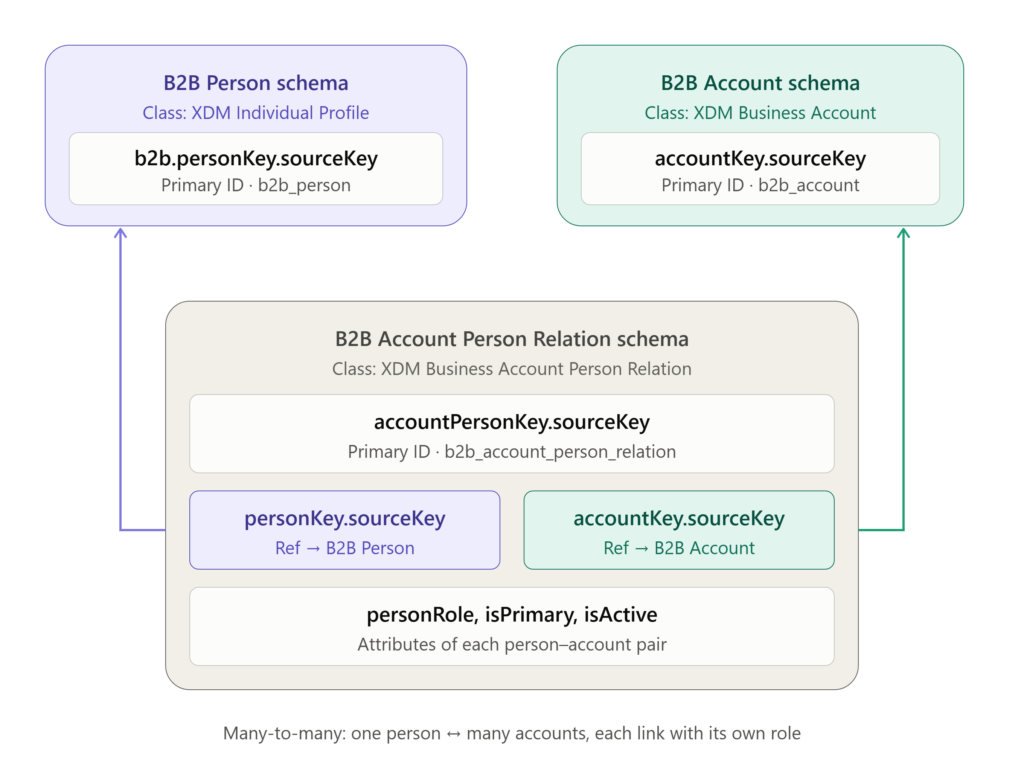
2. Multiple accounts per profile
In that situation, you would need to leverage the B2B Account Person Relation schema, your B2B person schema will only set the b2b_person identity in the b2b.personKey.sourceKey path.
Your B2B Account schema will only setup the b2b_account in the accountKey.sourceKey path as a secondary identity.
The B2B Account Person Relation will serve as the table, that you will load with the different relationships.
You will then need to define relationship between the account define in that table and the one define in the B2B account table and the same way with the B2B person table.
This is done by the following descriptors (created during the pre-requisite phase):
- descriptorRelationship:
- Link the personKey.sourceKey to the B2B person schema
- Link the accountKey.sourceKey to the B2B account schema
- descriptorReferenceIdentity:
- Link the personKey.sourceKey to the B2B person schema (so it connect to that identity b2b_person)
- Link the accountKey.sourceKey to the B2B account schema (so it connects to that identity b2b_account)
Note: you will also need to provide an unique identity in the accountPersonKey.sourceKey field for that schema. This ID is used as deduplicated field for the relationship you are creating. It is usually a composite key of account ID and Profile ID, so that next time when you do an upload for updating the relationship, the relationship is replaced.
| Identity Field | Relationship Field | |
| B2B Profile | b2b.personKey.sourceKey | – |
| B2B Account | accountKey.sourceKey | – |
| Account to Profile Relationship | accountPersonKey.sourceKey | personKey.sourceKey (-> b2b.personKey.sourceKey) accountKey.sourceKey (-> B2BAccount:accountKey.sourceKey) |
Summary of Account – Profile relationships (visual representation)
We can already summarize the different options available via diagrams, so it may make it easier to understand on how the things are actually connected.
Direct Relationship : 1 to 1

Many to Many relationships : N to N
SourceKey value creation
One of the most difficult part of the B2B setup for me was the composition of the sourceKey element.
In B2B model, you cannot pick any value to be an indentity, there are standard that need to be followed.
personKey, accountKey, accountPersonKey and the other B2B keys all use the standard B2B Source XDM data type. It is a composite identifier for a B2B entity such as an account, an opportunity, or a campaign.
The main reason for that is that you can have different CRM system that use the same ID but they refer to different opportunity or different account or different person.
Therefore the ID used in the B2B models are based on:
- sourceID: A unique ID for the source of the record
- sourceInstanceID: The instance of organization ID
- sourceType: The name of the platform providing the data
- sourceKey: this is the concatenated value of the previous elements such as [sourceID]@[sourceInstanceID].[sourceType]
Example:
"b2b": {
  "personKey": {
    "sourceID": "12345",
    "sourceInstanceID": "123-ABC-456",
    "sourceType": "Marketo",
    "sourceKey": "12345@123-ABC-456.Marketo"
  }
}Adding Meta Data to the B2B Context
The XDM representation of the B2B context allows to add more information about your account and your b2b profile person.
It usually comes down to the B2B activity schema, who is having the personKey.sourceKey defining the b2b_person.
In these activities, you can define the Campaign they were part of, and link campaign information in the B2B Campaign schema , the Opportunity you are chasing and linked these more detailed information in the B2B Opportunity schema.
The account will be linked via the B2B Account person relation defined (see above for the type of relationship).
The Marketing List will define Marketing activities and the Marketing List Member will define who is part of these Marketing activities.
Adobe defines

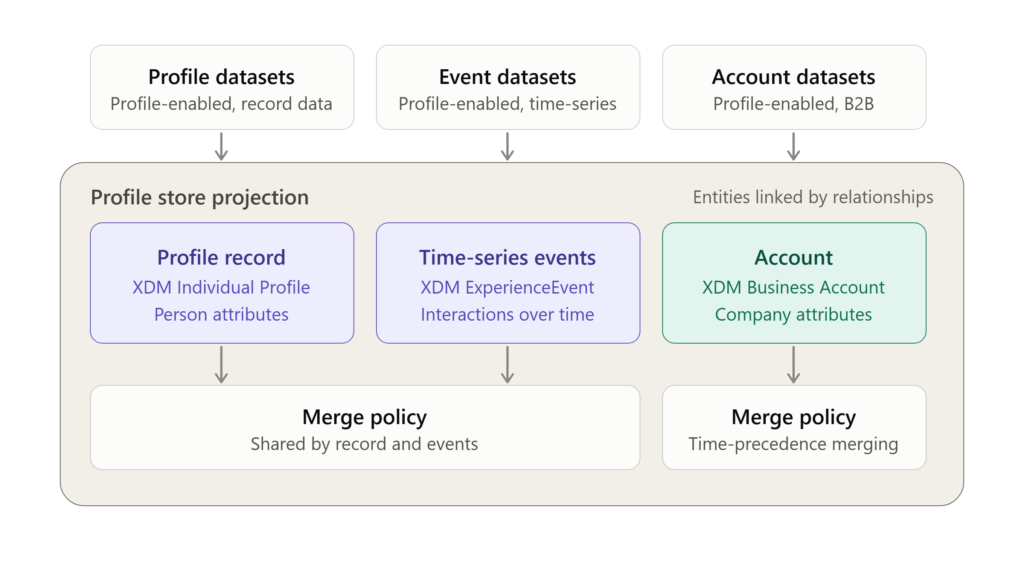
Profile and Account in UPS
Both profiles and accounts will live in the Unified Profile Store, both in their respective sotrages, relative to their respective classes.
The data lives independently and are merged, based on Merge Policies during the evaluation of segmentation, via the relationship that they have established in the data modeling (via identitiy, relationships).
The question comes often is how to link other identities to these b2b profiles or account ?
For example, if you have a website tracking, it is very unlikelikely that you will be able to map the logged in users to a b2b profile directly at that point in time.
The powerful things is that the B2B profiles does not stop a B2C stitching to happen, so having your crm ID tracked directly as an identity can still happen and help connecting, or stitching, these behaviors with the known profile.
What is needed afterwards is a mapping table.
Here are 2 solutions possible to have the mapping table between your CRM ID and your b2b_profiles:
- Use Data Distiller: In Adobe Experience Platform, you can create new dataset that can map the profiles via the Data Distiller license. If your CRM ID is part of the b2b profile, or accessible in the b2b profile dataset, use it to create the connection in a mapping table.
- Use an additional layer to build that mapping table between your 2 sources. The same way that you can use a layer in the data ingestion to prepare your data to be in B2B XDM format, you can leverage that layer to do the mapping before end and create this stiching table.

Not recommended: Setting the CRM ID field in B2B Person schema as identity.
This setup makes everything easier, but it may be possible that the same user has different b2b person, especially if your company handle small businesses. The plumber that is in your system via the CRM ID 124, could also be represented as an eletrician as well, but keeps having the same CRM ID “124”. This can lead to profile collapse.
It may be intentional as they are indeed the same person, but they can also lead to difficult campaign or segmentation targeting in the future.
Data Ingestion
The AEP B2B Edition comes with some sources connector directly modeled in the B2B data model or very close to them:
- Marketo Engage
- SalesForce
- Microsoft Dynamics
Marketo Engage is very broadly supporting the B2B Data Model, for the other connectors, you would requires to use Data Prep to generate some of the fields though.
In my case, we used a layer in between to transform the data from the client to the correct format needed in B2B data model. If your organization has the possibility to realize that, I would encourage, as it simplify data ingestion a lot, but required a transformation layer (Snowflake, Databrick, etc…).
Segmentation
The usage of Adobe Experience Platform B2B edition will also provide availability to create Account audiences.
These account audiences are batch only and the output will be the account list.
Also the relationship between Acount and Profiles are evaluated daily via a batch evaluation, so any audience that you create using both the account data and profile data can only be evaluated via batch.
You can create account specific audiences, such as Account which specific account attributes, defined in the B2B Account schema.
You can also mix the account specific attributes conditions in your audience with Profile specific attributes.
You can create these cross-entity audiences in both the Account Audiences part and the Profile Audiences part. As explained above, these kind of cross entities relationships are evaluated daily via batch evaluation.

Activation
External Destinations
One of the capability that can be leverage for audiences is their activation on selected destinations.
Adobe Experience League has a page dedicated for these use-cases: Activate Account Audiences.
The main use-cases are for the following destination:
- Bombora,
- Demandbase,
- LinkedIn Matched Audiences
- Cloud Export (to re-ingest in enterprise own system)
AJO B2B
Adobe Experience Platform comes with a deep integration for Adobe Journey Optimizer, and especially for B2B editions.
It offers possibility to create Journey and communication related around an account global status, and not only individual per individual.
AJO is a personal messaging system that build journeys to trigger personal communication (email, sms, push, etc…) and the B2B edition allows to center around the account information.
They also have the potential to use Buying Group so an account can be divided in sub group, but it is not the focus of this article.
Customer Journey Analytics B2B
Adobe Experience Platform comes also with a very deep connection to Customer Journey Analytics (CJA) and CJA now offers the B2B capability.
CJA offers analysis on event based information, and with the B2B you can focus that analysis on the account level.
It would be more interesting if you actually leverage the B2B Activity schema which leverage the b2b_person with timestamp information.
I will also not go into much details for Customer Journey Analytics B2B, as it is not the real subject and this article is already quite long
I hope I was able to help you better understand the B2B setup in Adobe Experience Platform, and let me know if I miss anything important or if you want to dig into specific topics.