Hello world,
As I’ve stated in my different blog posts, especially the recent one explaning the different AI terms, that AI is a very powerful tool.
I have tried to use it for some years now, and I sometimes encourage to do it too.
As such a very powerful, it should really help us and improve our efficiency. However, like many, I faced issue with the quality of the AI outputs. For a long time, there were issue with the models themselves, they were not being able to decode the context. It was also a prompting issue, not giving enough specificities to make it achievable.
Over time, I improved my prompting and the AI models became more capable at the same time, so it was getting better, but it was not really that useful for my work.
The main issue was that the AI models were very good at getting general knowledge, or search through documentation and available materials but it was not targeted to my specific setup, for my specific client.
However, during a discussion with customers and Adobe product team, I learned the term Knowledge Graph. Without knowing much about it, I understood directly that it gives the AI capability to understand in which context it is going to be used.
So I decided to give a try at understanding it, and maybe build one for myself.
Here is the result of what I have learnede and built.
Table of content
- Giving AI Context
- Ontology of AEP Knowledge Graph
- Extracting AEP knowledge graph with aepp
- Use-cases
Giving AI Context
A Knowledge Graph, sometimes called Context Graph, is the capability to provide a sort of a database of facts to AI.
Knowledge Graph have existed for some times, but their application in the field of AI is very interesting because it gives the AI a tool that it can call in order to understand the setup that is being used, or you that you want it to use, instead of letting the AI model guess or use general pattern, that may not be relevant to your implementation.
A knowledge graph is representing a set of Nodes and Edges, which represent entities (nodes) and their predicates (edges).
The predicates indicate the relationship between the entities.
They are grouped in triplets (entity, predicate, entity) that defines their relationship.
You can represent these in one way (Paul, loves, Emily) but also reverser (Emily, loves, Paul).
So the AI model sees their relationship regardless of whether it’s looking at Paul or Emily.
But if you add another relationship describing Paul’s connection to his mother Katrin, that relationship will only exist on the Paul entity — and on the Katrin entity too, if you model her. (Paul, bornFrom, Katrin) and (Katrin, birth, Paul).
A note is that predicates are not standardized per say, you can create as many predicates as you want, however, it is better if they are attached to a namespace, that group them into category.
To come back to our examples, you can have these namespace “Relationship”, “Family”, so you can display these triplet as:
(Paul, Relationships:Loves, Emily)
(Emily, Relationships:Loves, Paul)
(Paul, Family:bornFrom, Katrin)
(Katrin, Family:birth, Paul)
Also, you can create predicate and entity that do not define relationships per say, but just attributes to an entity, such as height, age, or else.
So for Emily:
(Emily,Person:height,1.70m)
(Emily,Person:age,56)
The difference between the Graph and a normal database is that you are explicitely setting the relationship between these artifacts, and do not rely on implicit Primary Key and Foreign Key to identify their relationship.
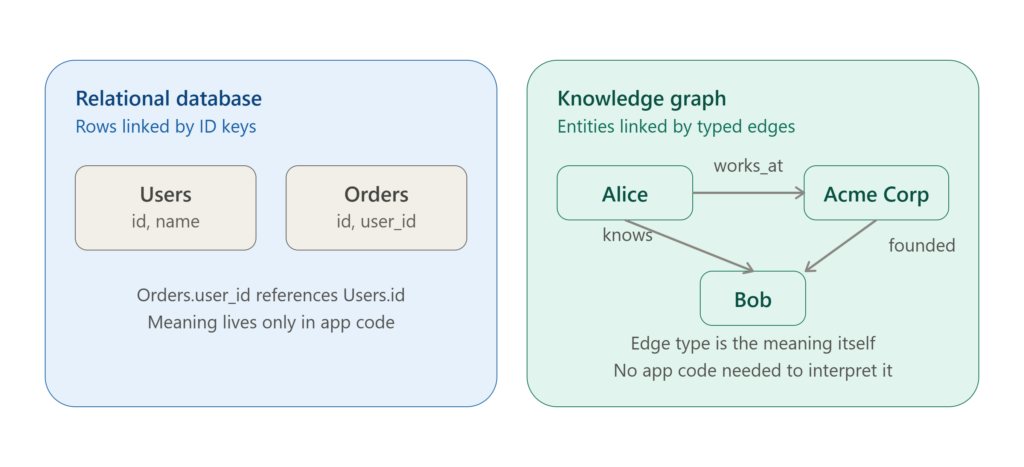
In the AI world, it is very useful because of the following arguments:
- Relationships are explicit, not inferred. An LLM reading a knowledge graph can see “Alice works at Acme Corp” directly, instead of having to guess that two numbers matching across tables implies employment.
- Multi-hop reasoning is natural. “Who does Alice know that works at a company she doesn’t?” is a graph traversal — a few edge-hops — rather than a chain of SQL joins the model would have to design correctly.
- Better grounding, less hallucination. When a model retrieves facts as structured triples (subject–relationship–object) instead of loose text or opaque rows, it has less room to invent a connection that isn’t really there.
- Heterogeneous data fits naturally. Real-world knowledge is messy and interconnected — people, places, events, documents. Graphs don’t require forcing everything into rigid table schemas up front the way relational databases do.
- Great for retrieval-augmented generation (RAG). Instead of retrieving isolated chunks of text, a model can pull a connected neighborhood of facts around a query, giving it richer context in one step. So fewer tokens are required to complete the task.
As you can see leveraging these knowledge graph has much advantages but few things I want to mention that makes them workable items:
- Graph Knowledge have a specific format, the one I am using is called RDF (Resource Description Framework), it is a W3C standard. It is widely supported but comes with a certain cost: you need to define the ontology used, because everything is an entity, and predicates aren’t really first-class citizens of that construct. You need to define these predicates beforehand in order for the graph to be meaningful.
Also, most of the ones I generate are turtle files. These are also widely supported. - Knowledge Graphs support a query language, known as SparQL. This is what actually makes it work.
The model will never be fed the whole graph, it will only query it, via a SparQL query language.
As I explained in my other article, AI models are very good at predicting / generating text, generating a Query Statement is one of the most easy task to do for an AI.
It will translate your search into a query to the graph. - I lied when I said that there are no standards in the predicates. There are some standards that exist in the W3C setup, and you can find them here. I used some of them in my implementation and we will review them, but mostly, as I wanted to create my own ontology, I mostly developed my own one. You can find the documentation of existing predicates definition here.
Ontology of Adobe Experience Platform Knowledge Graph
As told above, when creating a knowledge graph, it is important that you are defining the type of entities and the type of relationships these entities have, especially if it is following the RDF format and you do not use the out of the box predicates.
The definition of such a set of terms and relationships and the setup of the Graph is called the ontology of your implementation.
In order to really understand what the term ontology describes, I prefer to use the other terms, much more familiar to everyone: Dictionary and Taxomony.
Normally, everyone knows that a dictionary represent a term and its meaning, it is very simple description of each term included in that dictionary.
The taxonomy is mostly remember from school, for example, or when building family tree, the hierarchical relationship between entities is a taxonomy.
An ontology gives a way for more unstructured data to be represented with their relationships and attributes.
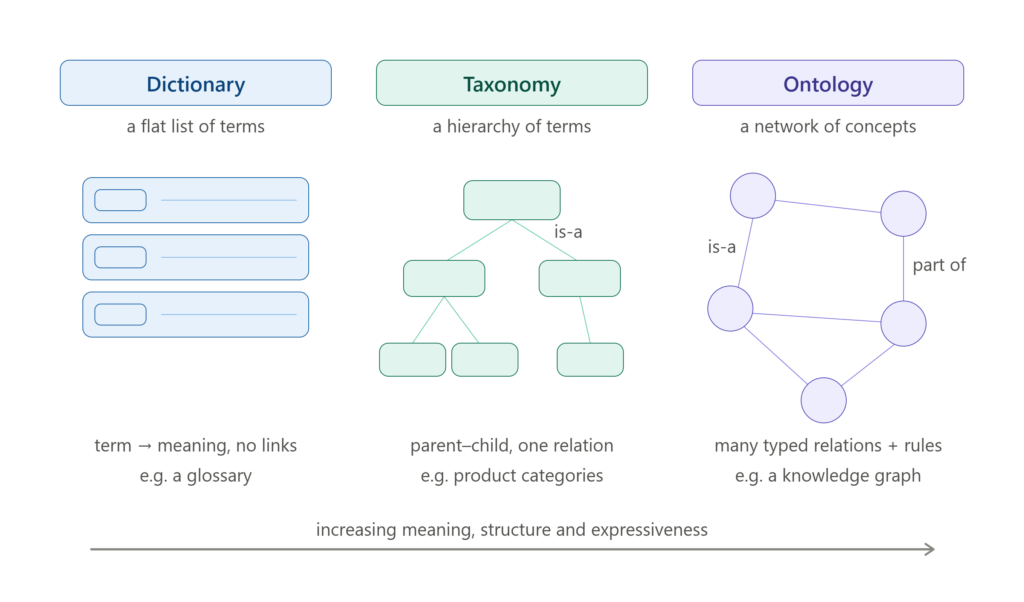
In this section I will review the definition used in that ontology for Adobe Experience Platform.
First the different namespaces that I used for defining the different main entities used in Adobe Experience Platform:
Namespaces
For a sandbox named mysandbox with tenant mytenant, the following namespaces are minted:
| Attribute | URI pattern |
|---|---|
| SANDBOX | https://sandbox/mysandbox |
| SCHEMA | https://sandbox/mysandbox/xdm/ |
| CATALOG | https://sandbox/mysandbox/catalog/ |
| IDENTITY | https://sandbox/mysandbox/identity/ |
| PROFILE | https://sandbox/mysandbox/profile/ |
| FLOWS | https://sandbox/mysandbox/flows/ |
| AUDIENCES | https://sandbox/mysandbox/audiences/ |
The relationship between them is straightforward, a sandbox exists, has a name, and contains the namespaces defined here.
Entity Types
Then, I defined the main types that are going to be defined in each entities in these namespaces, nodes are typed with rdf:type (RDF.type) using the following values:
| rdf:type | Meaning |
|---|---|
IDENTITY.namespace | an Identity namespace |
XDM.class | an XDM class |
XDM.schema | an XDM schema |
XDM.fieldgroup | an XDM field group |
XDM.datatype | an XDM data type |
XDM.path | a path (ex:_tenant.path.value) usedIn Schema, defines in a Field Group |
DCAT.Dataset | a dataset |
Flows.IngestionFlow | an ingestion flow (source connector) |
Flows.DestinationFlow | a destination flow |
Audiences.audience | an audience |
Predicates
And then I am defining the main predicates that are going to be used to define their relationships:
| Predicate | Usage |
|---|---|
RDF.type | node type (could be IdentityNamespace, class, schema, fieldgroup, datatype, path, DCAT.Dataset, Ingestion Flow, audience ) |
RDFS.label | human-readable title of a node |
DCTERMS.title | dataset title |
SANDBOX.contains | sandbox contains a top-level family (schema, catalog, flows, audiences, profile, identity) or a dataset/flow |
XDM.contains | The Schema Node contains classes, a schema contains a field path (detail=True) |
XDM.implements | a schema implements a class and Field Groups, a dataset implements a schema |
XDM.relationship | a schema (or field path) has a lookup/relationship to another schema, or to an identity namespace |
XDM.defines_on | a field group defines a field path, and the reverse link (detail=True) |
XDM.path | back-reference from a field path node to its schema (detail=True) |
XDM.description | description of a field path (detail=True) |
XDM.xdmType | XDM type of a field path (detail=True) |
XDM.identityField / SCHEMA.isPrimary | a field path is used as an identity field, and whether it is the primary identity (detail=True) |
XDM.origin | For field defines at field group level, if it is defined directly in the Field Group or via Data Type reference (detail=True) |
XDM.usedIn | a field path is used in a schema definition (detail=True) |
IDENTITY.contains | The Identity Node contains different namespaces |
IDENTITY.counts | number of full IDs in an identity namespace |
IDENTITY.linked | a schema (or a dataset via profile) is linked to an identity namespace |
CATALOG.contains | The Catalog containing the different datasets |
CATALOG.hasData | a field path has ingested data (detail=True) |
CATALOG.rows | number of data lake rows in a dataset |
PROFILE.participates | a dataset can participates in UPS or UIS |
PROFILE.counts | number of profiles in a dataset |
PROFILE.linked | a dataset is linked to the Profile Node if it has been enabled |
FLOWS.frequency | frequency of a flow, either STREAMING or BATCH |
FLOWS.loads | a flow loads data into a dataset |
FLOWS.usedIn | a field path or an audience is used in a flow (detail=True) |
FLOWS.audiences | The list of audiences that are part of destination flow (detail=True) |
FLOWS.sharedAttributes | The list of shared attributes for a destination flow (detail=True) |
FLOWS.mandatoryAttributes | The list of mandatory attributes for a destination flow (detail=True) |
FLOWS.primaryAttributes | The list of primary attributes for a destination flow (detail=True) |
AUDIENCES.contains | audience containment of different audiences IDs |
AUDIENCES.evaluation | evaluation methods for the audience, either BATCH, STREAMING, EDGE |
AUDIENCES.usedIn | a field path is used by an audience definition (detail=True) |
AUDIENCES.behavior | a field path is used by an audience definition (detail=True) and the behavior type, either Profile-based, Event-based or Relationship-based |
All of these information can be found on the github page of aepp: https://github.com/adobe/aepp/blob/main/docs/knowledge-graph.md
Extracting a knowledge graph with aepp
Now that you know everything that is being created when exporting a Knowledge Graph from the Adobe Experience Platform, how do you actually generate it via aepp?
As with everything in aepp, it is being built from a module, named knowldegegraph.
NOTE: Before you use it, make sure that you have the complete access rights for your sandbox for that developer project.
The usage from there is pretty simple:
import aepp
from aepp import knowledgegraph

mySandbox = aepp.importConfigFile('myconfig.json', sandbox='mysandbox', connectInstance=True)
myGraph = knowledgegraph.KnowledgeGraph(config=mySandbox)
myGraph.buildGraph(enabled=True, detail=True)
myGraph.exportTurtle("mysandbox.ttl")
You have now built the graph and exported it as a turtle format.
You will see a few options available, and I will describe some of them here, but the full documentation is available on the github: https://github.com/adobe/aepp/blob/main/docs/knowledge-graph.md
buildGraph parameters:
- hasData: if True, retrieves information based on datasets that contains data. Default
True - detail: if True, adds row-level information for each schema (field paths,
xdmType, identity field, primary key, description, …). DefaultTrue - enabled: if True, filters datasets down to the ones enabled for Profile or Identity. Default
False
The idea behind it is that you may want to only build the knowledge graph regarding the datasets that only contains data, so you do not pollute your graph with meaningless, test datasets or test schema that have no real values.
You can also build the knowledge graph for only artefacts that participates in AEP Profile or Identity store, getting to know what contributes to the RTCDP profile.
aepp CLI
All of these methods are available in the CLI, and here is how to perform these operations on your terminal for the command line interface.
py -m aepp.cli -cf myconfig-json -sx my-prod
my-prod> build_graph -ex True -v TrueThis is how simple it is to run the knowldge graph on the command line interface, and you can see that you can directly export the knowledge graph via the -ex parameter. I also added the -v for verbose in order to follow up on what is being generated.
Going beyound defined ontology
I believe that this a very good starting point to use the Knowledge Graph, but for those who know me, I tend to identify the limit in my implementation and give you options that are not available easily otherwise, so there are few additional methods that can be used to extend the Knowledge Graph that you have built:
- addPathAttribute: From any path of your implementation, you can add a predicates and a literral information to it. If you want to specify more information about a specific path, because it is very important or contain wrong information, you can do that using that method.
- addSchemaAttributes: The same, you can add more predicates and literal values to any of the schema based on its ID.
- addDatasetAttributes: Here the capability is to extend the dataset that you want, based on its ID, to your own predicate
Use Cases
I will define the different use-cases I have used the knowledge graph for, and most of them rely on the connection of the knowledge graph directly into your own AI Model.
There are some examples on how to do that in the github section following Knowledge Graph usage, I will link it here, but do not cover it here.
One important note is that you want to add the Ontology described above to your AI model so it knows how to query the knowledge with which types of relationship.
- Understand Sandbox implementation: For many users of Adobe Experience Platform, it is hard to know what is contributed where to your sandbox, you can directly query the AI model to explain to you the implementation done in your sandbox, and monitor it, based on the Graph Knowledge you have built.
Things such as:- Which Data Flows are loading data in my sandbox?
- Which datasets have the most data?
- Which paths are used in my audiences?
- Define Which schemas are related to which datasets? Or which schema are the most important ones for the audiences already defined.
- Compare Sandboxes: If you have multiple sandboxes and want to know which fields are both defined in these sandbox, extracting a knowledge for both sandboxes and then ask the AI to do the comparison.
- Validate a change or where to put a new path in your sandbox based on existing implementation. As it knows all the current implementation, you can let it define where you should add this new path or new field group.
- If you have a new source and a definiton of the data points you will get, you can ask the AI if there is already a schema that is somehow similar to this data source.
I think the potential is quite limitless, and I would be curious to know what you have been setting up yourself, once you get familiar with it.
Let me know in the comments if you have found very useful use-cases that you would like to share.
NOTE: A knowledge Graph is always a representation at one point in time of your implementation. Don’t forget to refresh it time to time.